Migrating a system with zero downtime
Patterns we use to replace production systems that cannot go down: strangler fig, shadow traffic, continuous data synchronization, and rollback in minutes.
In banking, insurance, or automotive manufacturing, there is no such thing as “let’s shut the system down over the weekend to migrate it”. You have thousands of concurrent users, mission-critical third-party webhooks, and transactions flowing 24/7. Having migrated complex platforms under those high-availability constraints for years, these are the architectural patterns we always rely on.
The core philosophy: never take a big bang leap
Failed migrations almost always share a common flaw: a planned “Cutover Day” where the legacy platform is turned off and the new system is switched on. When something breaks, everything collapses simultaneously in full view of customers.
The disciplined alternative is migrating in small, reversible, and measurable increments. It may look slower on paper, but in practice it delivers earlier because engineering teams do not waste weeks firefighting rollback disasters.
Understand the system and route traffic incrementally
First, establish a baseline observability layer
Before touching application code, establish deep observability on the legacy platform: response latencies, throughput volumes, error rates, and peak concurrency. Without that baseline, you have no objective method to determine whether the replacement system performs better, worse, or equivalently.
This discovery phase frequently surfaces unrecorded system behaviors: an undocumented nightly cron batch upon which general accounting depends, an external client hitting an API endpoint assumed to be dead, or a batch CSV picked up over SFTP every Monday morning.
Strangler fig: strangle, do not replace
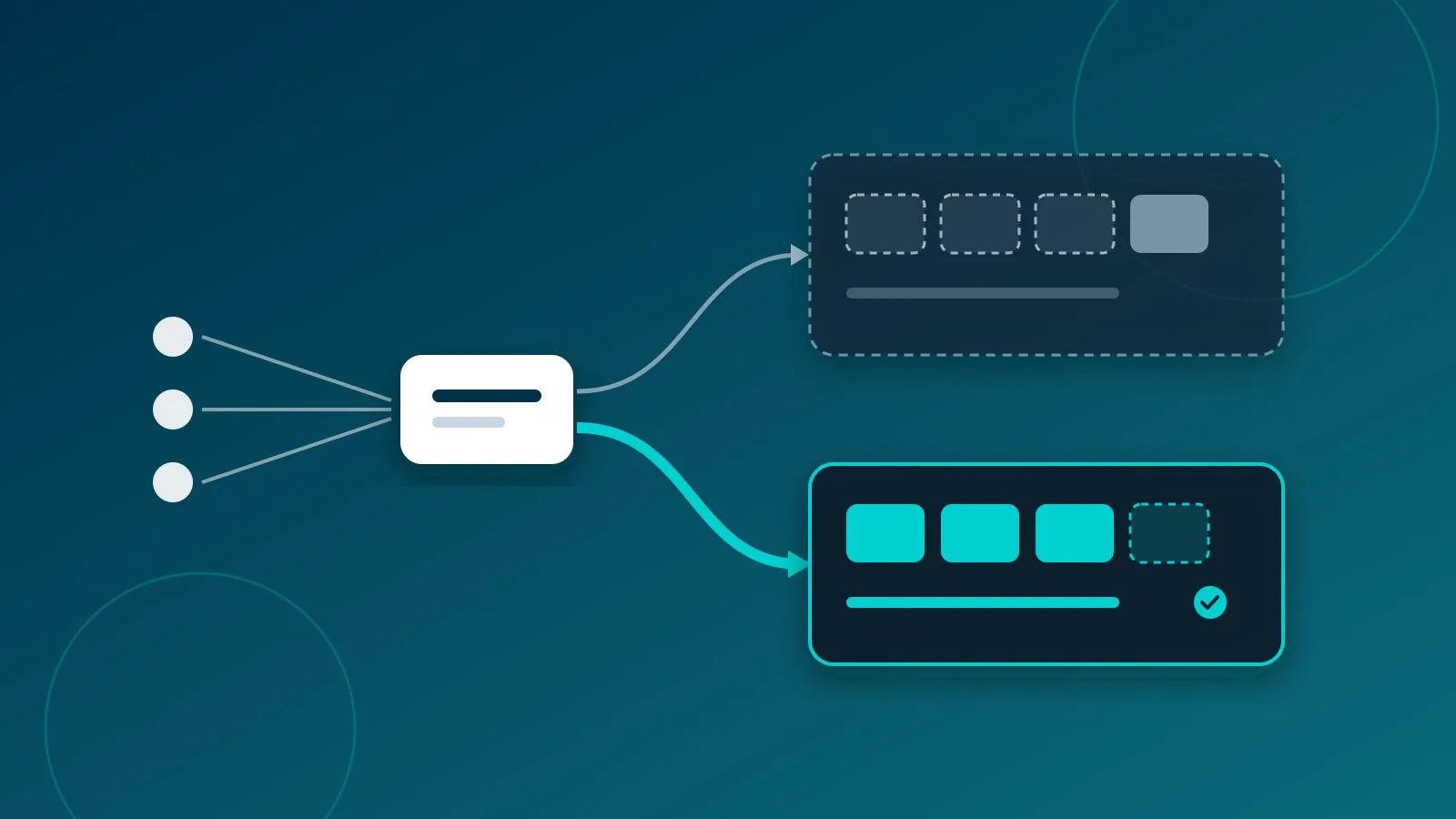
The strangler fig pattern introduces an intermediary routing proxy or load balancer in front of the legacy application to inspect incoming traffic and decide its destination.
Initially, 100% of traffic routes to the legacy system. When a specific functional slice is implemented and verified in the new system, the routing layer begins redirecting that specific path. Slice by slice, the legacy system sheds responsibilities until it can be retired without users ever noticing.
Shadow traffic before production traffic
Before allowing the replacement service to handle real production responses, route a replicated stream of live requests to it. Compare its response payloads against the legacy system’s responses without exposing the new service to end users.
Beware of side effects: the shadow system must operate in a read-only or mocked state—it must never trigger outgoing transactional emails, execute real credit card authorizations, or mutate third-party records. Its role is strictly calculation and assertion.
With nginx, for example, this is achieved using the mirror directive (with legacy and modern upstreams pre-configured):
location /api/ {
    proxy_pass http://legacy;             # responds directly to the user
    mirror /shadow;                       # silent copy dispatched to new system
    mirror_request_body on;
}

location = /shadow {
    internal;
    proxy_pass http://modern$request_uri; # response is discarded by nginx
}
nginx simply duplicates the incoming HTTP request and discards the shadow response; validating discrepancies between both payloads is handled by your log pipelines or automated diff tooling.
Discrepancies discovered here are invaluable. Some are bugs in the new implementation; others are historical quirks or known bugs in the legacy system that you may need to preserve for backwards compatibility. It is infinitely better to discover them here than during an emergency customer escalation.
Data synchronization is the hardest engineering challenge
Porting business code is straightforward compared to moving live databases that never stop mutating. Our standard synchronization progression:
- Initial bulk migration of historical records into the new data store.
- Continuous change data capture (CDC) replicating real-time mutations occurring in the source database during development.
- Automated reconciliation jobs: background workers continuously verifying consistency across both databases and triggering alerts on anomalies.
- Ownership flip: write operations shift to the new system, leaving the legacy database in read-only mode for a transitional grace period.
Step 3 is the one teams skip most often—and the one that saves the most late-night crises.
Crucially, design your rollback path upfront: once the new system accepts writes, falling back to legacy requires reverse data synchronization. That reverse pipeline must be tested and proven before cutover day.
Feature flags and zero-downtime deployments
Feature flags over cutover deployments
Deploying code should not be coupled with activating features. Using feature flags, new code paths can be toggled on first for internal staff, then for a 5% canary cohort, and finally rolled out to 100% of traffic.
If an anomaly surfaces, flipping the toggle off reverts the behavior in milliseconds—eliminating the panic of high-stress hotfix deployments.
Blue/Green and Canary rollouts
We apply the same zero-downtime philosophy to infrastructure. In a blue/green deployment, the new release starts alongside the active release, and the load balancer swings traffic atomically. In a canary deployment, a small fraction of real users is routed to the new instance while telemetry is closely observed.
In nginx, a simple canary can split traffic using split_clients (with current and next_gen upstreams defined):
# 5% of client IPs route to the new version
split_clients "${remote_addr}" $version {
    5%  next_gen;
    *   current;
}

location / {
    proxy_pass http://$version;
}
Scaling the canary simply involves increasing the percentage and reloading nginx configuration (nginx -s reload). Instant rollback involves reverting the line and reloading. In production systems, hashing on authenticated user IDs or session cookies is preferred over IP addresses so individual sessions experience a consistent interface.
In both strategies, the legacy version remains warm until metrics confirm stability. A rollback plan must be proven in practice before you ever need it.
Communication and verification
Operational communication is part of the architecture
The operational teams relying on the software daily must understand what is changing, when milestones occur, and whom to notify if edge cases arise. Many migration incidents are not software bugs: they are users struggling to find an altered button layout on Monday morning.
A checklist for your next zero-downtime migration
- Do you possess comprehensive baseline performance metrics of the current platform?
- Can you isolate and migrate an individual feature slice independently?
- Can you stress-test the new system using shadowed production traffic without side effects?
- Do you have continuous reconciliation verifying database consistency on both sides?
- How many minutes does it take to roll back, and have you actively tested that rollback?
If you answer “no” to any of these questions, that is where your architectural risk resides.
Key takeaways
- Migrate via small, reversible, and measurable increments—never a single high-risk big bang cutover.
- Benchmark existing baseline metrics, mirror live traffic silently, and reconcile data continuously.
- Always validate your rollback mechanism under controlled conditions before cutover.
Maintaining a legacy platform that has hit architectural limits but cannot afford downtime? Let’s discuss. These zero-downtime challenges are where our engineering team thrives. And when architecting the new backend, explore how we choose backends for each project.
Related articles
AI glossary in one image: token, embedding, RAG, agent, harness, and MCP
Six essential artificial intelligence concepts explained with technical clarity: how text is tokenized, vectorized, retrieved, and connected to external tools.
What is an LLM? Architecture, mechanics, and production limits
What a large language model (LLM) is, how it processes tokens through transformers, its real hallucination and context limits, and how to integrate it in production systems with RAG.
Django or Supabase: why our ERP and our apps use different stacks
Almeebar uses Django REST and PostgreSQL; BIT Project, BIT Talents and our CMMS use React and Supabase. The criteria we use to choose backends for each project.